
How to password protect workbook in Excel Mac 2011
Excel for Mac 2011 users can password protect the workbook using the option provided as part of the File menu. Click the File menu and select Passwords from the displayed menu list.
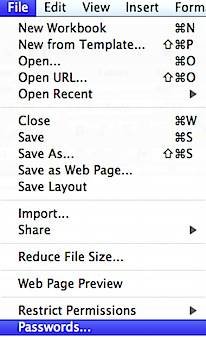
This would display the following File Passwords window with different password option.
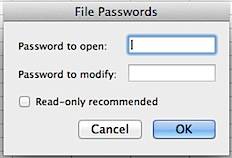
You can set a password for opening the excel workbook using the Password to open field. Similarly to set a password for modifying the content in the excel workbook, you can use the Password to modify. If you want to make the workbook as readonly then mark the check box labelled as Read-only recommended.
Need iOS Help?
I help developers and founders with:
- New apps — idea to App Store
- Bug fixes, debugging & rescue
- App Store rejections
- Code review & mentoring
10+ years iOS • 10+ published apps • 11,000+ students trained